


-

 Orders & Payments
-
Placing Orders
Placing OrdersHow do I check the balance on my Gift Card or eVoucher?
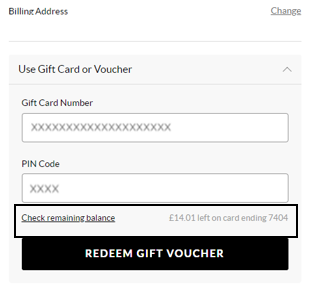
To view your balance on a Gift card or eVoucher you will need to add your items to the basket first and then once you've selected your delivery option you will be taken to the payment section. You will be presented with all the payment options available for your order. Select ‘Use Gift Card or eVoucher’ and enter your eVoucher/credit note code and pin number and then select ‘Check remaining balance’, you will then be able to see your balance.
Questo articolo vi è stato utile? Yes No
Invia un feedbackGrazie per il vostro feedback.
Se desiderate approfondire il tema di come possiamo migliorare questo contenuto, potete condividere un feedback specifico con l'autore dell'articolo qui sotto.
Nota bene: questo feedback NON mette in contatto con il team del Servizio clienti. Se avete bisogno di contattarlo, premete Annulla qui sotto, quindi premete Contattaci e seguite la procedura.
-
Placing Orders